
Gmail controls a large share of global email traffic. When messages fail to reach Gmail inboxes, email marketing performance can drop quickly without marketers realizing what is happening. Many businesses assume their campaigns are delivering successfully because their platform shows the emails as sent. In reality, Gmail may filter, throttle, or block those messages before the recipient ever sees them.
Gmail’s filtering system has become more aggressive. The platform evaluates authentication records, sender reputation, engagement signals, and sending behavior before deciding where a message should land. Businesses using platforms such as Klaviyo, Mailchimp, HubSpot, or custom SMTP systems frequently encounter Gmail delivery problems without understanding the underlying cause.
Even companies with legitimate opt-in lists can experience poor inbox placement when authentication is misconfigured, sending patterns are inconsistent, or email lists contain inactive contacts.
This guide explains the most common reasons emails fail to reach Gmail inboxes and the steps businesses should take to correct the problem. Email Engagement Pros specializes in diagnosing and repairing deliverability issues for companies that depend on email-driven revenue.
How Gmail Handles Incoming Email
Gmail’s Multi-Layer Filtering System
Gmail uses a layered filtering system to determine where each email should land. Messages may appear in the inbox, the Promotions tab, the spam folder, or be rejected before delivery.
To make this decision, Gmail evaluates multiple signals, including:
- Sender reputation
- Domain reputation
- IP reputation
- Authentication records (SPF, DKIM, DMARC)
- Engagement metrics such as opens, clicks, and replies
- Spam complaint rates
- Email content patterns
Gmail also reviews sending behavior over time. Consistent sending patterns and positive engagement strengthen reputation, while sudden spikes in volume or low engagement can increase the likelihood of filtering.
Gmail’s 2024–2025 Sender Requirements
Gmail has introduced stricter requirements for bulk email senders. Businesses must meet several technical and behavioral standards, including:
- Proper email authentication
- One-click unsubscribe functionality
- Low spam complaint rates
- Reliable sending infrastructure
Senders who fail to meet these standards often experience filtering or reduced inbox placement.
Why Gmail Delivery Problems Are Often Invisible
Emails can appear as “sent successfully” inside most email platforms. This does not guarantee inbox delivery. Gmail may throttle large campaigns, route messages to spam, or silently drop them before delivery.
Because these actions are not always visible in standard email reports, businesses often misinterpret declining engagement or campaign performance as a sign of declining performance without realizing that Gmail filtering is the cause.
Common Reasons Emails Fail to Deliver to Gmail

Missing or Misconfigured Authentication
Authentication problems are one of the most common technical reasons emails fail to reach Gmail inboxes. Gmail expects several DNS records to verify the sender’s identity:
- SPF
- DKIM
- DMARC
Common configuration problems include:
- SPF records exceeding DNS lookup limits
- DKIM signatures that are not aligned with the sending domain
- Missing or inactive DMARC policies
- Email platforms are not authorized within the DNS records
Authentication matters because Gmail uses it to confirm that the sender is legitimate. Proper authentication helps prevent spoofing and phishing while improving trust in the sending domain.
Businesses should regularly verify:
- DNS records for SPF, DKIM, and DMARC
- Alignment between the sending domain and the “From” domain
- Authentication status inside Google Postmaster Tools
Poor Domain Reputation
Gmail tracks reputation primarily at the domain level. If a domain develops a poor reputation, inbox placement becomes increasingly difficult.
Factors that damage reputation include:
- High spam complaint rates
- Purchased or scraped email lists
- Sudden spikes in sending volume
- Frequent bounce rates
- Sending to inactive subscribers
Gmail monitors several reputation signals:
- Historical engagement
- Spam complaint history
- Spam trap hits
- Consistency of sending behavior
Example: a company sends a large campaign to an outdated list. Engagement is low, and complaints increase. Gmail responds by routing future campaigns to spam or the Promotions tab.
Weak Engagement Signals
User engagement is a major factor in Gmail’s filtering decisions.
Key signals Gmail evaluates include:
- Opens
- Clicks
- Replies
- Deletions without reading
- Mark-as-spam actions
Negative engagement patterns include:
- Users are deleting emails immediately
- Repeated campaigns with no interaction
- Long periods of inactivity on subscriber lists
Gmail interprets low engagement as a sign that the emails are unwanted. Strong engagement improves inbox placement, while weak engagement increases the likelihood of spam filtering.
Sending to Inactive Email Lists
Unmaintained email lists are a major contributor to Gmail filtering.
Problems caused by stale lists include:
- Higher bounce rates
- Low engagement signals
- Spam complaints from subscribers who forgot they signed up
- Potential spam trap hits
Common causes include:
- Lists have not been cleaned for years
- Old leads imported into new platforms
- Contacts added without confirmation
Recommended practices include:
- Removing inactive subscribers regularly
- Running re-engagement campaigns
- Segmenting lists based on activity levels
Inconsistent Sending Behavior
Gmail favors predictable sending patterns.
Common mistakes include:
- Long gaps between campaigns
- Sudden bursts of high-volume sending
- Frequent changes to sending IP addresses
- Multiple email platforms are sending from the same domain
When sending behavior is inconsistent, Gmail may interpret it as suspicious or spam-like activity.
Example: a company sends no campaigns for several months and then sends 100,000 emails in one day. Gmail may throttle the campaign or block delivery entirely.
Poor Email Infrastructure
Technical infrastructure also plays a role in deliverability.
Potential issues include:
- Shared IP addresses with poor reputations
- Unmonitored SMTP servers
- Improper reverse DNS configuration
- Sending domains that were never warmed up
Shared environments can be risky. If other senders on the same IP generate spam complaints, your deliverability may suffer as well.
Common solutions include:
- Using dedicated sending domains
- Gradually warming new IP addresses
- Monitoring sender reputation regularly.
Content Factors That Trigger Gmail Filtering
Spam-Like Formatting
Gmail evaluates the structure and formatting of every email. Messages that resemble common spam patterns are more likely to be filtered.
Common formatting triggers include:
- Excessive capitalization
- Overuse of promotional language
- Too many images with minimal supporting text
- Link cloaking or disguised URLs
- Suspicious URL shorteners
Technical formatting problems can also increase filtering risk. These include:
- Broken or poorly coded HTML
- Large image-only emails with little readable text
- Emails that display poorly on mobile devices
Clean formatting, balanced text-to-image ratios, and properly coded HTML help build trust in Gmail.
Misleading Subject Lines
Subject lines that appear deceptive or manipulative often trigger filtering.
Risky practices include:
- Clickbait-style language
- Artificial urgency, such as exaggerated deadlines
- Misleading claims or promises that do not match the content
- Excessive punctuation or symbols
Gmail uses machine-learning models to identify patterns commonly associated with spam campaigns. Subject lines that resemble those patterns can reduce inbox placement.
Suspicious Links or Domains
Gmail scans links inside emails to evaluate safety and trust signals.
Potential problems include:
- Links pointing to newly registered domains
- Multiple redirect chains before reaching the final page
- Domains previously associated with spam activity
- Tracking links that do not match the sender’s domain
Businesses should verify that all links use secure domains, valid SSL certificates, and consistent branding between the sending domain and the landing page destination.
How to Diagnose Gmail Deliverability Problems
Use Google Postmaster Tools
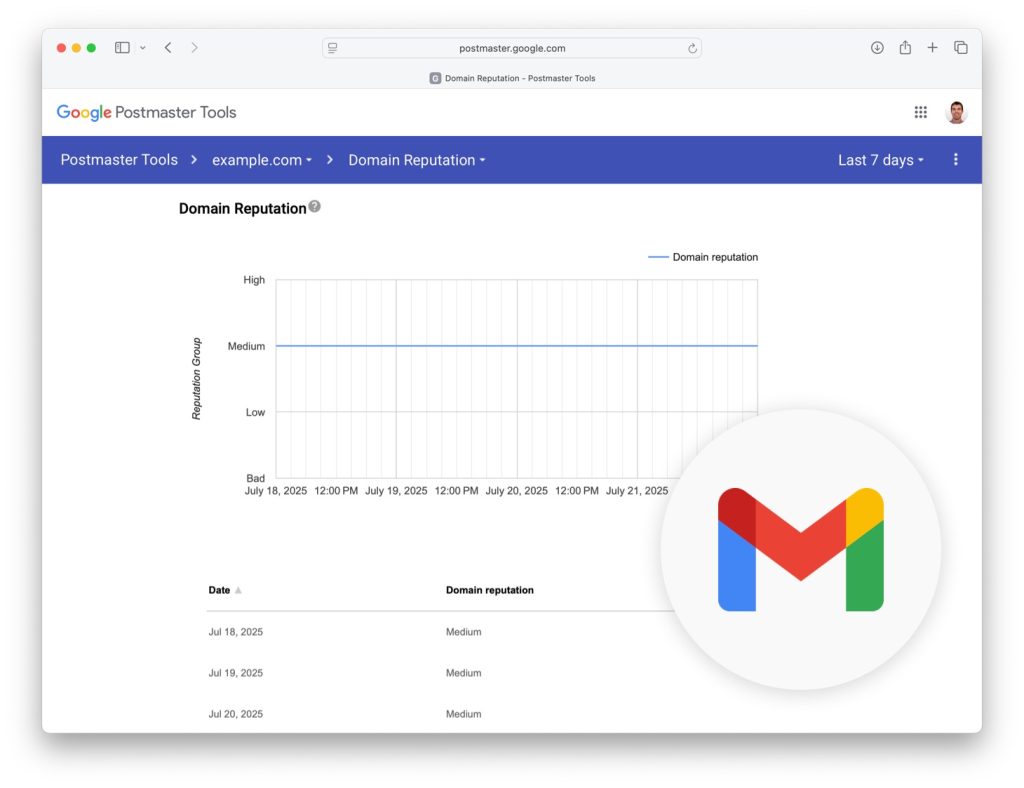
Google Postmaster Tools provides insight into how Gmail views your sending domain. It allows businesses to monitor reputation and identify technical problems affecting delivery.
Key data available includes:
- Domain reputation
- Spam complaint rate
- Authentication status
- Delivery and error reports
Important metrics to monitor include:
- Spam complaint rates
- IP reputation levels
- Domain reputation trends over time
Tracking these metrics helps identify whether Gmail considers a sender trustworthy or potentially risky.
Run Inbox Placement Testing
Inbox placement tools simulate sending emails to Gmail accounts to determine where messages actually land.
Testing can reveal:
- Inbox placement rate
- Spam folder placement
- Potential filtering triggers
Common tools used for testing include:
- GlockApps
- Mail Tester
- MXToolbox
Regular testing helps isolate deliverability issues before they impact major campaigns.
Analyze Engagement by Domain
Engagement metrics should be analyzed by the email provider. Segmenting performance data by domain often reveals Gmail-specific issues.
Examples of useful analysis include:
- Gmail open rates compared to Yahoo or Outlook
- Click rates by domain
- Bounce rates by provider
When Gmail engagement is significantly lower than that of other providers, it often indicates filtering or deliverability issues that need to be addressed.
Strategies to Improve Gmail Deliverability
Implement Proper Authentication
Proper authentication is the foundation of strong Gmail deliverability. Businesses should verify that the following records are correctly configured:
- SPF setup
- DKIM signing
- DMARC enforcement
More advanced improvements include:
- DMARC monitoring to track authentication failures
- Domain alignment between sending domains and message headers
- BIMI implementation to strengthen sender identity and brand trust
These authentication signals help Gmail verify the sender’s legitimacy and improve inbox placement.
Improve List Hygiene
Maintaining a clean subscriber list strengthens engagement signals and reduces spam risk.
Recommended practices include:
- Removing inactive contacts after defined inactivity periods
- Confirming new subscribers using double opt-in
- Avoiding purchased or scraped email lists
- Regularly cleaning bounced or invalid addresses
Healthy lists consistently generate stronger engagement metrics, which Gmail uses as a positive reputation signal.
Send to Engaged Subscribers First
Prioritizing engaged subscribers helps reinforce positive reputation signals.
Recommended approach:
- Segment subscribers based on recent activity
- Send campaigns first to the most engaged users
- Gradually expand to broader segments as engagement stabilizes
This strategy signals to Gmail that recipients value the messages.
Maintain Consistent Sending Patterns
Predictable sending behavior improves sender trust.
Best practices include:
- Sending campaigns on consistent schedules
- Avoiding sudden spikes in volume
- Gradually warming up new sending domains or IPs
Consistency helps Gmail recognize legitimate email programs.
Monitor Sender Reputation Continuously
Ongoing monitoring helps detect problems before they damage deliverability.
Businesses should track:
- Spam complaint rates
- Bounce rates
- Spam folder placement
- Engagement trends
Useful monitoring tools include:
- Google Postmaster Tools
- SenderScore
- Dedicated deliverability monitoring platforms.
How Email Engagement Pros Help Businesses Fix Gmail Delivery

Email Engagement Pros helps businesses identify and resolve the issues preventing emails from reaching Gmail inboxes. Many organizations struggle with deliverability without realizing the problem lies in technical configuration, sender reputation, or list management. The team focuses on diagnosing those issues and implementing the changes needed to restore reliable inbox placement.
Key services include:
- Deliverability audits to identify technical and behavioral issues affecting Gmail placement
- Gmail reputation analysis using tools such as Google Postmaster Tools
- DNS authentication setup, including SPF, DKIM, and DMARC configuration
- List hygiene strategy to remove inactive contacts and improve engagement signals
- Email infrastructure optimization for sending domains, IP configuration, and platform setup
- Inbox placement testing to measure real delivery performance across Gmail accounts
These improvements help businesses rebuild sender trust with Gmail and other major email providers.
Clients working with Email Engagement Pros typically see:
- Higher inbox placement rates
- Increased engagement from subscribers
- Improved campaign performance
- Stronger return on investment from email marketing programs
If your emails are not reaching Gmail inboxes, the problem is likely deeper than your email platform reports.
Email Engagement Pros can diagnose deliverability issues, repair sender reputation, and implement the infrastructure needed for reliable inbox placement.
Visit www.emailengagementpros.com to schedule a deliverability audit and start improving Gmail inbox performance.
FAQs
Why are my emails going to Gmail spam?
- Gmail filters emails based on sender reputation, authentication setup, engagement signals, and spam complaints. Poor list hygiene or missing DNS authentication often causes spam placement.
How can I check if Gmail is blocking my emails?
- Use Google Postmaster Tools to review domain reputation and spam rates. Inbox placement testing can also reveal Gmail filtering behavior.
Does email content affect Gmail deliverability?
- Yes. Spam-like formatting, misleading subject lines, suspicious links, and poor HTML structure can increase the likelihood of being filtered.
How long does it take to repair Gmail sender reputation?
- Reputation recovery can take several weeks to several months, depending on the severity of the issue and improvements in engagement and sending behavior.
Should businesses use dedicated sending domains?
- Dedicated domains often improve deliverability by separating marketing email from primary business communication and allowing better reputation management.